
ABC VideoRoll
- What is it?
- What do I install?
- Are there any alternative packages?
- Any bugs I should know about?
- What extra software works well alongside it?
What is it?
ABC VideoRoll is a freeware Win32 video editor. It has a curious user interface and is not without its fair collection of bugs, but the fact it is free, handles a wide range of file formats including QuickTime (it's actually based on the QuickTime engine) and has an extremely simple and well thought-out timeline system made me decide it was the right tool for the jobs I've done in the past.

Menu panel, the main control point for ABC VideoRoll
Produced by a company with a website calling itself ABC TV but a splash screen calling itself "Advanced Technology Partners inc.", VideoRoll is now an orphan, its parent company long gone. It will unfortunately nag you at specific plus a few random intervals for a registration number, which of course you can no longer obtain. Just clicking on "Remind me later" lets you continue, but it's annoying.
| Aside: | This is a good lesson for those companies who insist on user registration for products! If your software is free, or someone has paid their hard earned cash for it, why should your company going out of business and your website disappearing mean that they can no longer use your software? Your hard work only lives on if the software still runs. So do the smart thing, and try to produce a registration mechanism that is not an essential part of the program's operation or degrades gracefully if your Web site can't be reached. |
I have no explicit permission to include the archive here because there is, as far as I know, nobody around to give me that permission. However, if you have a compelling argument that shows the archive should be removed, please just e-mail the request to me and I'll comply.

Clip gallery, showing the various resources in the project
What do I install?
The latest version produced seems to be v2.5.72, which comes as a self extracting .exe file. However, in my experience this is less stable than the other build floating around on the net, v2.5.70. Since I have limited space on this site I have only made the older version, which comes in a Zip file, available for download. If you want to try the later one please e-mail me. In time I may be able to move the files to an alternative host which gives more space, so I can include both.
So, Download the Zip file, unpack it somewhere, find SETUP.EXE and run it.
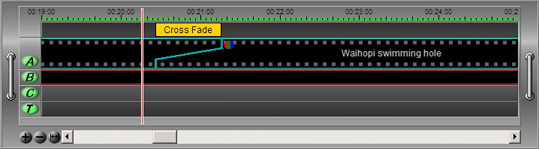
Timeline display - editing happens here
Documentation is included with the software, including some online help in its own docked window that updates to show information on items as you click on them. The user interface is a bit wierd and takes some learning, so this is an extremely useful thing to have switched on at first!
Are there any alternative packages?
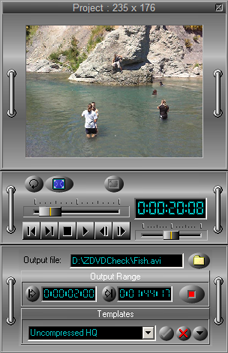
The preview window, transport and related controls
I've not really got into it myself but another free alternative for video editing is the Zwei-Stein Video Editor. Further, some remarkable video effects can be made using Wax - all for free.
Any bugs I should know about?
Unfortunately, quite a few!
VideoRoll is only moderately stable, so you should get used to saving your project files frequently. That said, the only major problems I've found are:
- It loads MPEG files, but doesn't seem to handle them properly. The only real workaround is to convert them to another format, for example, uncompressed AVI.
- Now and then you'll start it and one or more of the windows in the UI will be closed. If this is the main toolbar window, you're stuck - you have to uninstall and reinstall the software to get it back, as far as I can tell. Fortunately this only takes a couple of minutes and doesn't harm your project files.
- If you have complex transitions or your machine is too slow to keep up preview playback in general, audio can stop playing back and may stay dropped out. If you attempt to restore it by reselecting the audio track, VideoRoll generally crashes. Instead, just save your project, then quit and restart VideoRoll to get everything going nicely again.
- The video filters generally work well, except brightness or contrast changes which work in preview but often give a full white output for the duration of the filtered clip. Nasty - there's no workaround - you have to use something like VirtualDub (see below) to pre-filter your material.
- Uncompressed AVIs of any significant size will cause VideoRoll to grind horribly or even fail completely. If you are heading into the territory of high two to three digit file sizes, consider using mild compression to reduce the input size.
These may sound bad, but out of all the many packages I've tried the above were actually a walk in the park compared to some of the crippling howlers in other software! :-O
More minor issues are:
- If your soundtrack is in a compressed format like MP3, sync to visible components may be slightly out. To ensure AV sync for near-frame-accurate timing between video and audio, work on an uncompressed (linear PCM, i.e. simple WAV) soundtrack during editing.
- Frequently, and particularly if your movie starts with a fade-in from black, the very first frame of rendered video will be full frame white. This is most noticeable if the movie is played back with looping, as there's a bright flash after the loop point. I've got used now to starting all projects with the first visible elements appearing at +1 seconds in the timeline, and making sure the selection for rendering the movie starts there too. The output then does not include a bright frame.
- The built in video titler is of average quality - you may do better by creating a title AVI on a black background in some other package, then placing it on top of video track A as a transparent overlay. But the built in stuff does seem to work OK, all the same.
What extra software works well alongside it?
I've found the following to be very useful tools when combined with VideoRoll. I've no connection with any of the people producing this software as far as I know - I just think these packages are well worth trying out.
- VirtualDub - generalised
video processing, an excellent tool. I find a modified version with
some useful built in stuff very good - it's called VirtualDubMod and
you can find it
here.
- For MPEG encoding, you cannot do better than
TMPGEnc. It does MPEG 1 forever for
free, and MPEG 2 on a 30-day trial, after which you can pay for it. It
also has a really useful set of MPEG tools to join, split, mux and demux
streams. Pegasys do a huge
number of commercial packages based around TMPGEnc which you may find
very useful depending on your requirements.
- The QuickTime Components
Project provides various plug-ins for the QuickTime architecture
which can extend the range of formats available to QuickTime applications,
including ABC VideoRoll. Ogg Vorbis support is currently the most complete
and useful of the offerings there.
- If you intend to make a DVD, you will find it hard to do better,
for flexibility, features and price - though it's far from free! - than
the excellent
DVDLab Pro.
It has a full, unrestricted 30-day trial period. There are
various bundles on offer there too, some including TMPEGEnc variants.
- If you want to author DVDs under a specific region code, you'll need a
tool to get around the stupid restrictions in PC hardware and software
for DVD region playback when it comes to testing your discs (the
assumption is you're a dirty rotten pirate, which is always deeply
flattering as a consumer!). So have a look at
DVD43Free for a very neat, small,
software-only solution to the problem.
- Should you be working with MPEG and discover that your carefully made
stream has some wrong flags or something, check out ReStream at
this site for a way to fix things.
- Finally, if you're into AVISynth you probably already know about the AVE Visual Editor package, but I thought I'd mention it here just in case.


